Most auto-switchers hand you two close-ups ping-ponging at each other. Technically, the right camera every time, and still an hour of work before it is watchable.
Auto Camera Switcher is a podcast editing plugin that cuts a multicam interview automatically, inside Adobe Premiere Pro. It also cuts to the person listening, covers the pauses, and puts your wide where the conversation actually asks for it.
What comes back is a fuller edit: one that reads as directed rather than assembled, and needs far less fixing before it is watchable.
A three-hour recording comes out at 500 to 600 cuts once the reactions, the wides and the pauses are in. ACS places all of them in about a minute, and cutting to the extra cameras is included.
I built it because I was making those decisions by hand, over and over, on every episode I cut.
Why ACS
A 30-day free trial
Long enough to cut real episodes before you pay.
No hour limits
Cut as many episodes as you like, as long as you like, for the same monthly price.
Your audio stays on your computer
ACS measures it on your machine. Nothing is uploaded.
Edits like an editor
Reactions, pauses and wide shots, not just the loudest microphone.
Checks your tracks first
If a mic or camera has a gap, starts late, or two speakers share one recording, ACS stops and tells you exactly which track to fix.
Your work is safe
Your sequence is backed up first, and every effect, grade and reframe stays where it is.
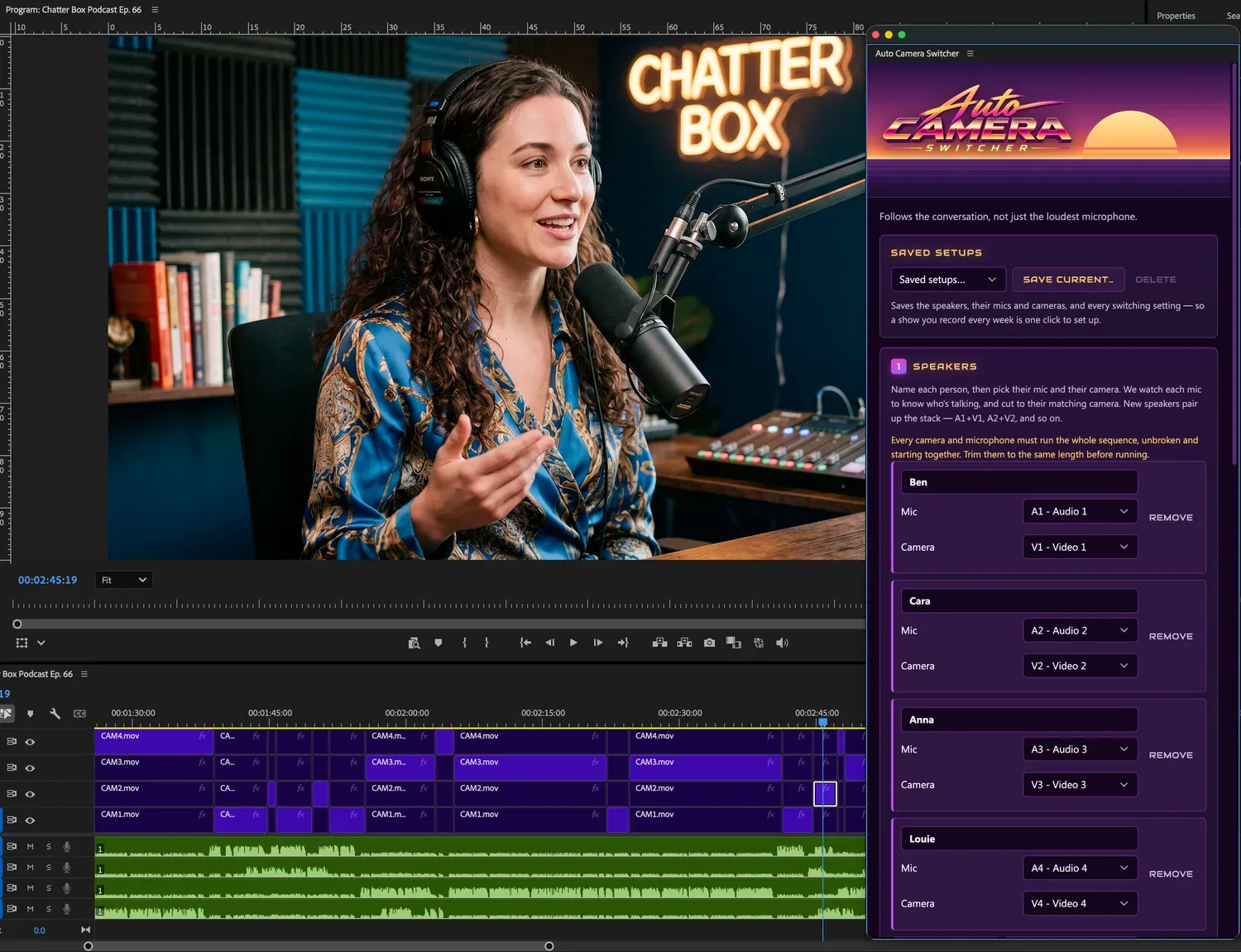
Four speakers assigned, and the timeline ACS produced.
What ACS does
It cuts to whoever is speaking
Each person’s microphone decides when their camera is on. It looks for the one that is loudest by a clear margin, so the others hearing them through the room does not move the camera.
It cuts to the person listening
A laugh, an mm-hmm, someone jumping in. You get the reaction, then you are back. Long enough to land, never long enough to look like a mistake.
It covers your pauses
A real pause gets a cutaway. A breath does not.
Your wide lands where it should
Not sprinkled about for variety. It goes where the conversation asks for it: when people talk over each other, and when one shot has run too long.
It knows a wide from a second angle
A two-shot leaves your speaker, so it is spent carefully. Another angle on the same person does not, so it is used freely. A tight single never covers crosstalk.
Run it twice, get the same edit
Change one setting and you see exactly what that setting did.
Loudest mic alone Anna is loudest
Auto Camera Switcher Anna has the floor
The same minute, cut two ways
Cutting to the loudest microphone alone gives you: Anna is loudest. Cuts to Ben for a “mm-hmm”. Flips between them while both talk. Ben is loudest. Cuts to Cara. One shot for the whole answer. Holds on Ben through the pause. Cara is loudest.
Auto Camera Switcher gives you: Anna has the floor. Ben says “mm-hmm”. Too short to be a turn, so the camera does not move. Both talking at once. The group shot is the only frame with both of them in it. Ben has the floor. Cara reacts. A brief beat on her, then straight back. Ben’s answer has run long. His second angle, the same person from another camera. Nobody speaking. Cut away rather than sit on a face. Cara has the floor. Anna again.
How it works
- 01
Tell it who is who
Point each speaker at their camera track and their microphone track. Two people or six, it does not care.
- 02
It listens
The audio is decoded and measured on your own machine. Nothing is uploaded, and no part of your footage leaves your computer.
- 03
It cuts
It saves a copy of your sequence, then cuts the camera tracks so the person speaking is the one you see.
What to expect
It is a first pass, not a finished edit
Overlapping speech, mic bleed and similar-sounding voices can put a cut on the wrong person. Watch it before you deliver.
It checks your tracks first
If a mic or camera has a gap, starts late, or two speakers share one recording, ACS stops and tells you exactly which track to fix, instead of quietly cutting to the wrong person.
It needs clean tracks
One mic per speaker, and every camera and mic running the whole sequence without gaps.
Your sequence is backed up first
Every time, before it touches anything.
macOS will not warn about it
It is signed with an Apple Developer ID and notarised with Apple, so it installs and runs without the “unidentified developer” dialog.
What you need
Installing it
Premiere extensions come as a .zxp file, which neither macOS nor Windows can open by itself. One free app handles that, and you only need it the first time.
Download the plugin · Mac and Windows, always the newest version.
- 01
Get the free installer
A .zxp is the standard format for a Premiere extension, and neither macOS nor Windows has anything that opens it. ZXP Installer, from aescripts, is a small free app that does, on both. You need it once.
- 02
Drag the plugin onto it
Open ZXP Installer and drop AutoCamSwitcher.zxp onto the window. It tells you when it is done, in a few seconds.
- 03
Restart Premiere
Quit it fully and open it again. A running Premiere will not notice a newly installed extension.
- 04
Open the panel and paste your key
Window, then Extensions, then Auto Camera Switcher. Your license key was emailed to you when you started your free trial.
Download ZXP Installer · free, made by aescripts, not by us. The same app removes the plugin again later, which is worth knowing before you need it. Adobe’s own installer inside Creative Cloud works too, but it is a command-line tool.
30-day free trial
$15
per month after that
plus tax where applicable
We’ll email you 3 days before your free trial ends. Your card is charged when it ends, unless you cancel before then. Cancel whenever you like.
Or pay yearly: $150 a year (save $30), same free trial.
By starting the free trial, you accept the license agreement.
Read the privacy policy before you buy, and the license agreement, which includes the refund policy. The same agreement ships inside the plugin and can be opened from its panel at any time.
← sofer.studio